
What should an NDIS provider website include?
Good NDIS website design answers four questions fast: what supports you provide, who you support and where, whether you're registered, and how to get started. Participants, families and support coordinators all check those before they make contact, and most of them do it on a phone.
Every NDIS provider website we build covers:
- Your supports in plain words. "Help at home with cooking and cleaning" beats "daily living assistance solutions". Use the NDIS support names as well, because coordinators search for them.
- Who you support and where. Age groups, the disabilities your team has experience with, and the suburbs or regions you cover.
- Your registration status and how participants can pay, whether their plan is NDIA-managed, plan-managed or self-managed.
- A clear way to start. Phone, email and a short referral form, so people can pick the way that suits them.
- Real photos of your team and spaces. Stock photos make care feel generic. People want to see who will turn up.
- An accessibility statement that says what standard the site is built to and how to ask for information in another format.
Who is an NDIS provider website actually for?
At least five groups use it, and they want different things. A participant wants to know if you feel right. A support coordinator wants to know in thirty seconds whether you have capacity and how to refer.
| Visitor | What they're looking for | What the page needs |
|---|---|---|
| Participants | Will this provider understand me? | Plain language, real photos, how a first visit works |
| Families and carers | Is this safe and reliable? | Team bios, screening and training, how you handle feedback and complaints |
| Support coordinators | Capacity, area, registration and how to refer | A referral page with a short form, your reply time and service area |
| Plan managers | Can I pay this provider? | Your ABN, registration status and an accounts contact |
| Workers you want to hire | Is this a good place to work? | A careers page with roles and how to apply |
Most provider sites are written for none of these people. They read like a funding application. We write each page for the person most likely to land on it, and keep the referral path one tap away on every page.
How accessible does an NDIS website need to be?
Aim for WCAG 2.2 Level AA. That's the benchmark the Australian Human Rights Commission points to in its guidance on equal access to digital services under the Disability Discrimination Act, and for a disability provider it's the minimum people will expect.
In practice, NDIS website design to WCAG 2.2 AA means:
- Text and buttons with enough colour contrast to read in sunlight or with low vision.
- Everything works with a keyboard alone, with a visible focus outline so people can see where they are.
- Text can be enlarged to 200% without breaking the layout.
- Alt text on images that carry meaning, and captions on videos.
- Buttons and links big enough to tap, and the same menu in the same place on every page.
- Forms with clear labels, plain error messages and no puzzle CAPTCHAs.
An honest note: nobody can promise a site is perfectly accessible to every person. Automated checkers only catch some issues, so we also test with a keyboard and a screen reader before launch. An accessibility overlay widget doesn't fix the code underneath, so we don't add one.
How should you show NDIS registration on your website?
If you're a registered NDIS provider, say so plainly near the top of the home page and on your referral page, list your registration groups, and link to your listing on the NDIS Commission's provider register so people can check it themselves.
Logos need more care. The NDIA's logo guidelines say no business may use the NDIS logo without written consent from the NDIA, and only registered providers may use the logos made for registered providers. Those rules have changed in recent years, so we check the current guidelines on ndis.gov.au before any logo goes on your site.
A few things we won't write, because they can mislead participants:
- "NDIS approved" or "100% NDIS funded".
- "Official NDIS provider" for a business that isn't registered.
- Any wording that suggests every support you offer can be claimed from every plan.
If you're not registered, that's fine. Many good providers aren't. Say clearly that you work with self-managed and plan-managed participants, so NDIA-managed participants and their coordinators don't waste a call.
What makes a good NDIS referral form?
A good referral form is short, asks only what you need to make first contact, and tells the person what happens next. Support coordinators fill in a lot of these. The easy ones get used first.
We usually ask for:
- The referrer's name, role and contact details.
- The participant's first name, suburb and preferred contact method.
- The supports needed and how often.
- How the plan is managed.
- Consent to share the participant's details, as a required tick box.
Leave plans, diagnoses and reports for the intake call. You don't need them to reply, and every extra piece of personal information you collect is more you have to protect.
The form should also say how fast you'll reply, and then you need to keep that promise. A study by MIT and InsideSales found leads contacted within 5 minutes were 21 times more likely to qualify than leads contacted at 30 minutes. Referrals work the same way: the provider who replies first often gets the participant. If you add Omega CS, every web form enquiry gets a text back in seconds from your own Australian mobile number, missed calls get a text back too, and you get a summary so your intake team can follow up.
How much does an NDIS website cost?
NDIS website design with Source Digital costs $1,750 + GST for a single page or $3,250 + GST for a 5 to 8 page site with a page per support. Every price is fixed and quoted in writing before we start, and there are no lock-in contracts.
Most providers are best on the business site. A page each for supports like daily living, community access, support coordination or therapy gives each one a chance to show up when someone searches for it. A single page suits a sole provider offering one support in one area. Hosting is about $10 to $50 a month, and ongoing support and changes start at $200 a month. For a wider view of pricing, see our guide to website cost in Australia.
One page for a single service in a tight area.
- One page, mobile first
- Tap to call and a quote form
- Google Business Profile linked
- Basic SEO and tracking
Most tradies and service businesses.
- 5 to 8 pages, one per service
- Written for local and AI search
- Your real photos, no stock
- Schema, analytics and Search Console
Shopify or a custom storefront.
- Store design and setup
- Products, payments and shipping
- SEO for every product page
- Launch support
Booking systems, portals and web apps.
- Hand-coded for speed
- Integrations and custom logic
- CRM and automation built in
- Scoped in writing first
Prices exclude GST. Hosting is separate, about $10 to $50 a month depending on platform. Ongoing changes and support from $200 a month.
Will an NDIS website show up on Google and in AI search?
It can, if each page matches what people search. Families and coordinators search for a support and a place, like "support coordination Joondalup" or "SIL providers Perth", and more of them now ask ChatGPT or Google's AI answers the same question.
So we build a page for each support and area, open each one with a plain answer, add FAQs written the way people ask, and add structured data so search engines understand your services and location. We also set up or tidy your Google Business Profile, which is often what shows first for local searches. If you want to be quoted in AI answers, our AEO service covers that in more depth.
A new site usually takes 2 to 3 months to start picking up local searches. We can't promise rankings, and anyone who does is guessing.
NDIS website design we've built
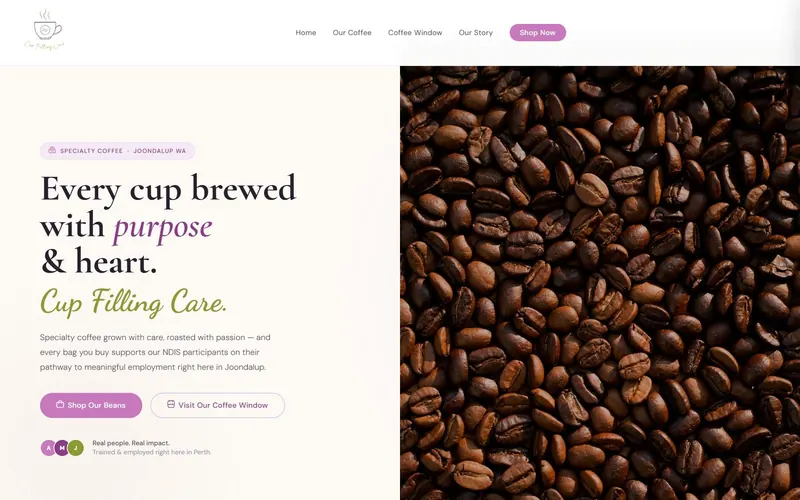
Cup Filling Care is a Perth specialty coffee window run as an extension of Purple Heather, an NDIS service provider. It's a community concept, and the site had to explain the program warmly and simply while capturing enquiries from NDIS participants.
We built a custom HTML site with a Shopify Buy Button for beans and merch. It took 4 weeks from design to launch and scored 94 for Lighthouse performance. The tone is warm, the layout is uncluttered, and every enquiry path is short.
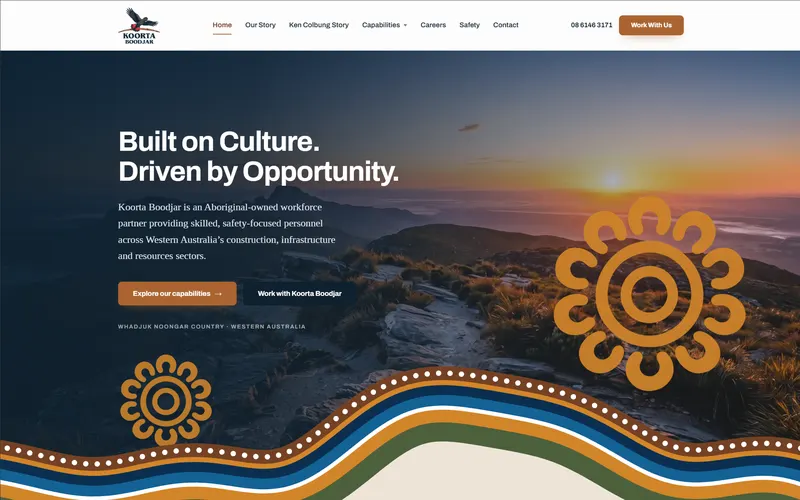
We also built the site for Koorta Boodjar, an Aboriginal-owned labour hire and workforce business in Balcatta, where the brief was to follow their brand guidelines and Bidi artwork while keeping every page easy to read. Same principle on both: the site works for the people using it, not the people who made it.